We wrote earlier about the two mistakes students make on Cannizzaro reaction questions. If you'd typed "Cannizzaro" into the Search page instead of opening that post, you'd have landed on the same information a different way — and that's really what Search is for: getting to one specific fact fast, without remembering which chapter it lives in.
One box, searching everything at once
Search isn't scoped to chapter text. A single query checks chapter guides, named reactions, formulas, and PYQs together, so you don't need to know in advance whether what you're looking for is "a reaction," "a formula," or "a question" — you just need the name.
Exam filter chips keep results relevant to you
If you're preparing for one exam, the filter chips narrow results down so you're not wading through JEE Advanced-level detail when you only need the NEET version of an answer, or the reverse. Set your exam once per search and the results stay scoped to it.
What a real search actually returns
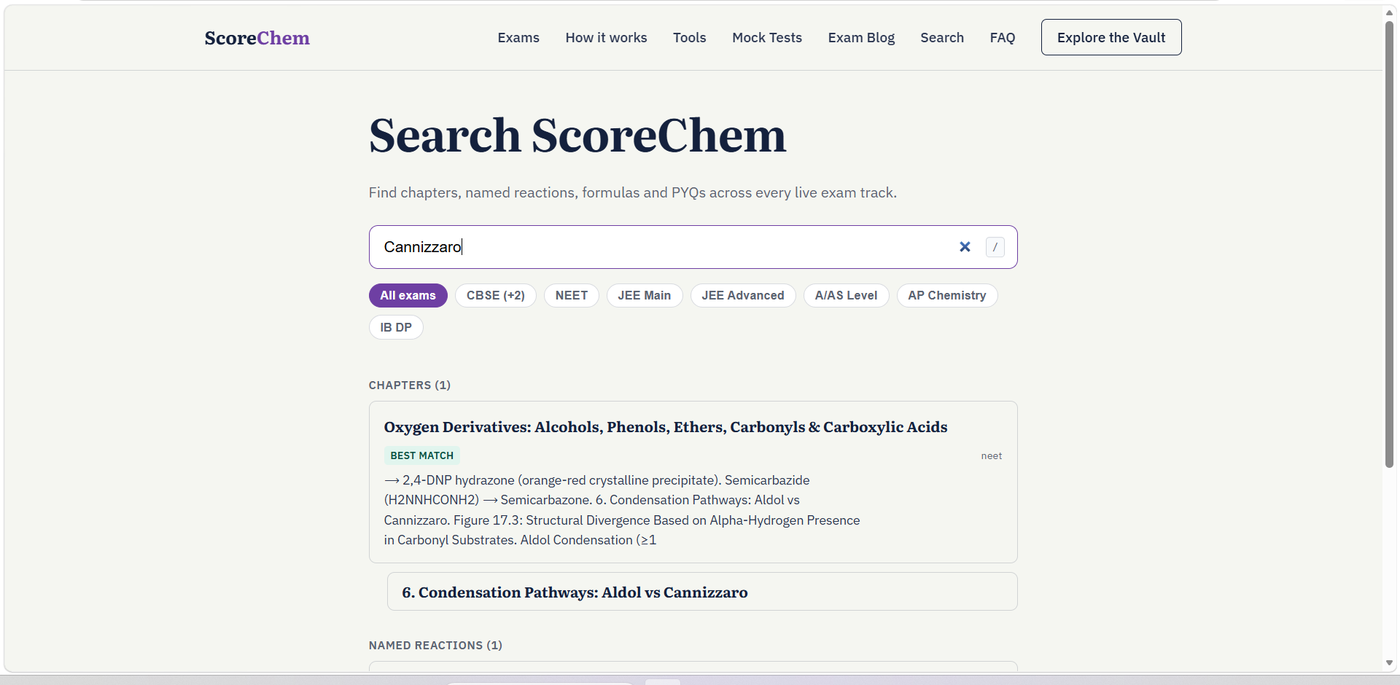
Searching "Cannizzaro" returns a BEST MATCH card: the chapter it belongs to, a short excerpt so you can confirm it's the right hit before clicking, and a deep link straight to the numbered section inside that chapter's guide — not just the top of the page. Below that sits a separate Named Reactions result, since a reaction like Cannizzaro is indexed on its own, not only as part of whichever chapter happens to mention it.
When to search instead of browsing
Browsing chapter by chapter is the right move when you're learning a topic properly for the first time. Search earns its place in the week before an exam, when you already know the chemistry and just need one specific thing again — a formula you half-remember, a named reaction you can picture but can't place, or a PYQ you solved once and want to find rather than re-solve. Try it the next time you catch yourself about to re-open an entire chapter guide for one line of it.